



.svg.png)

Choosing between a dedicated sales tool and the work management platform your team already uses doesn't have to be an either-or decision. monday crm (often written as monday.com crm) is monday.com's dedicated CRM, built on the monday.com Work OS specifically to help a sales team manage a sales pipeline without leaving the platform. This crm review covers what it actually does, how its AI and automation features hold up, and whether it's the right crm for a team already on monday.com.
What Is monday CRM?
monday crm is monday.com's answer to the traditional customer relationship management category: a flexible, no-code system built specifically for sales instead of general project management. Salesforce's own definition of CRM is a useful baseline if the concept itself is new to your team. Unlike a rigid, object-based crm system, this uses the same boards, columns, and dashboards that make monday.com's broader work management platform familiar, just pointed at leads, deals, and accounts instead of tasks.
Here's the short version of what it actually does: monday crm helps teams track deals from first contact to close, monday crm offers pipeline views and reporting built specifically for sales, and monday crm provides automation and AI on every paid tier. monday crm is built directly on the same engine as every other monday.com board, monday crm is highly customizable, and monday crm supports Gmail, Outlook, and Slack out of the box. monday crm adapts to almost any process a team already runs, customizing stages and fields to mirror it rather than forcing a rigid template. monday crm makes lead routing automatic, monday crm takes minutes to configure from a template, and monday crm brings pipeline, automation, and AI together in one place instead of three separate tools.
That flexibility is really the whole pitch. A basic crm forces a team into someone else's idea of a workflow; this one bends to whatever a team already runs, which is also why onboarding tends to be faster than most: there's no rigid data model to fight before the first pipeline goes live. Need a crm that doesn't force a rigid process? crm is a flexible option built for exactly that. monday crm's biggest advantage is really its adaptability: build a crm around whatever your team already does, and use crm features like custom fields, automations, and dashboards to shape it further. If the underlying board mechanics are new to you, our step-by-step guide for beginners covers them first.
How Do You Get Started With monday CRM?
Getting started with monday crm begins with picking a template close to your actual sales process, then adjusting from there. monday.com offers several pre-built pipeline templates, and starting from one beats building from a blank board, since it gives you real stages and columns to react to immediately.
To try monday crm risk-free, sign up for the 14-day trial and import existing contacts or connect an email account to pull leads in automatically. From there, choose monday crm's Basic tier if you just need pipelines and contacts, or move straight to Standard if two-way email sync matters from day one.
Explore monday crm's templates library before building anything from scratch. Most common setups, B2B, agency, real estate, already have a starting point close enough that customization takes minutes instead of hours, and this monday crm setup process rarely takes longer than an afternoon even for a first-timer. If you're not sure whether to use monday crm right away or test it first, the trial answers that question quickly; sales crm software this flexible rarely feels wrong within the first week. Our workflow management guide covers the planning side of rolling out a new system like this across a whole team.
How Does the Sales Pipeline and Dashboard Work?
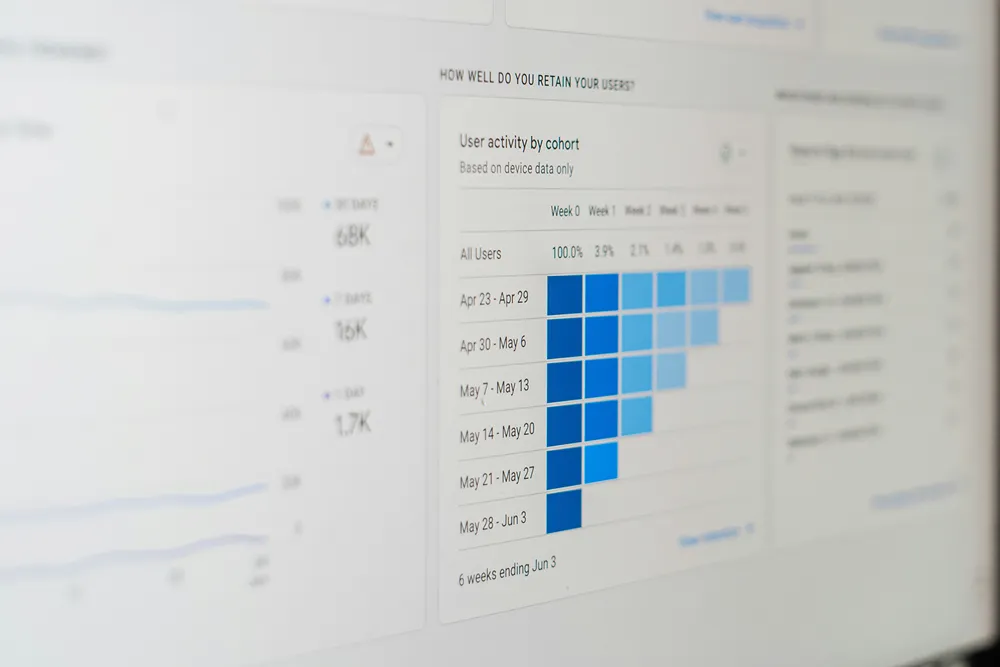
A sales pipeline here is a visual board: each deal is an item, each stage is a group, and dragging a deal from one stage to the next is the entire interaction. This mirrors how most sales teams already think about their process, which is a large part of why it feels intuitive on day one rather than requiring weeks of training.
Every deal item can hold contact details, deal value, expected close date, and whatever custom fields the process actually needs, keeping crm data in one place instead of scattered across email threads and spreadsheets. A dashboard pulls from one or more boards to show deal value by stage, rep performance, or forecasted revenue, and the higher tiers add forecasting dashboards specifically built for this.
Crm dashboards like these turn a weekly pipeline review from a manual export into a live view anyone on the team can check without asking someone else to pull a report first. A full sales cycle, from first touch to signed contract, lives on the same board, so how crm works here rarely requires jumping between tools mid-deal. Where a deal needs to relate to an account record or a delivery project on another board, our guide to connect board and mirror columns covers how to tie those together without duplicating anything.
What AI Features Does monday CRM Offer?

AI shows up throughout rather than as a single bolted-on feature. The AI automation builder can turn a plain-language request, “notify me when a deal hits Proposal,” into a working rule without anyone touching a settings menu manually, which is a meaningfully different experience than the automation builders most CRMs shipped even two years ago.
Beyond automation, its ai features cover writing and summarizing: drafting a follow-up email, summarizing a long email thread before a call, or enriching a contact record with details pulled from public sources. Use the ai to save the small chunks of time that add up across a full day of sales activities, rather than expecting it to replace judgment on which deals actually deserve attention.
Advanced features like lead scoring and true forecasting AI aren't quite as mature yet as the writing and automation side, so it's worth treating this AI as a genuine productivity boost today rather than a fully autonomous sales assistant. monday crm features like these keep expanding every quarter, and monday crm integrates new AI capability directly into existing boards rather than shipping it as a bolted-on module. Our comparison of monday.com, Asana, ClickUp and Jira covers how each platform's AI stacks up if you're still weighing the wider ecosystem.
How Does CRM Automation Save Time?
Crm automation is where the manual work of running a sales process actually disappears. A rule watching for a stage change can assign a task, notify a manager, or fire off a templated email the moment a deal moves, so nobody has to remember to do it by hand every single time.
The same logic applies to lead assignment automatically: a new lead arriving through a form gets routed to the right rep based on territory or deal size, instead of sitting in a queue until someone notices it. Our guide to building forms in monday.com covers how to capture those leads in the first place. This is the same engine that runs monday.com's broader side of things, so anyone who's set up rules on a project board already understands the pattern here. Our broader guide to business process automation covers this same trigger-and-action thinking beyond sales specifically.
Pricing tiers gate how much of this you get: Standard includes a meaningful chunk of monthly automation actions, and Pro multiplies that allowance considerably for teams running heavier volume. This is really what separates a genuine crm solution from a glorified contact list: use the crm's automation layer once, and manual follow-up mostly disappears.
What Integrations Does It Support?
Seamless integration with monday CRM is one of its stronger selling points for teams already juggling several tools. Two-way Gmail and Outlook sync means every email tied to a contact shows up automatically, without anyone forwarding or copying anything manually.
Beyond email, it integrates with Slack, marketing platforms, and general-purpose automation tools, keeping deal updates flowing to wherever a team already communicates. Our guide to the best monday.com integrations covers which of those are native and which need an outside platform, and monday.com's own writeup on connecting sales and marketing covers this pattern in more depth for teams weighing marketing-to-sales handoffs specifically.
It connects cleanly with the rest of the monday.com ecosystem too, so a project board tracking implementation work can pull straight from a closed-won deal without anyone re-entering account details a second time. Monday work and sales work end up living on the same platform this way, which is part of why a management tool built for one often ends up handling both.
monday CRM vs Other Tools: Is It the Right CRM for You?
HubSpot vs monday crm is the comparison that comes up most often, and it largely comes down to structure. HubSpot pushes a more opinionated, marketing-integrated setup out of the box; this one stays closer to a blank canvas a team shapes around itself. CRM.org's independent review covers this tradeoff well if you want a deeper side-by-side.
Whether it's the right crm depends less on features and more on how your team already works. A team that likes structure imposed for them will probably prefer a more rigid competitor; a team that already lives on monday.com boards for everything else will find it right at home almost immediately, since nothing about the interface needs relearning.
Flexible platforms like monday crm genuinely shine for teams running a non-standard setup, multiple product lines, unusual deal stages, hybrid sales-and-services work, since a rigid crm software product often forces exactly that kind of team into awkward workarounds. A customizable crm platform matters most here: teams that need a crm product flexible enough for non-standard stages usually land on something like this over a more rigid competitor.
How Much Does monday CRM Pricing Cost?
Monday crm pricing runs four tiers on annual billing: Basic starts things off with unlimited contacts and pipelines but no email sync or automation; Standard adds two-way email sync and a real automation allowance; Pro adds forecasting dashboards and a much larger automation allowance; Ultimate is quote-based for large or complex deployments.
Crm pricing here scales with automation volume and integrations rather than purely seat count, so the honest advice is to estimate how much automation your process will actually lean on before committing to a tier. It also runs on a completely separate schedule from the core work management product, which our breakdown of monday.com pricing covers in detail. A basic crm setup, just pipeline and contacts, works fine on the entry tier, but most teams outgrow it within weeks once they want automation and email sync.
Core crm functionality, pipelines, contacts, boards, is available even on the cheapest paid tier, worth knowing if budget is the main constraint early on.
What Are the Benefits of monday CRM for Sales Teams?

The benefits of crm software in general are well established: fewer dropped leads, a shared view of the pipeline, and less time spent updating three different tools to reflect the same deal. This delivers all of that while adding the flexibility of a broader management platform underneath.
Contact management stays genuinely useful because it's connected to everything else a team tracks: a sales rep can see not just deal history but any related project without switching tools. Task management tied directly to a deal means follow-ups don't live in a separate to-do list nobody checks consistently. Our data analytics work often starts by reviewing exactly this kind of pipeline data once a system has been live for a quarter, and our customer and UX research work digs into where prospects actually drop out of the process.
Any team wondering whether a crm can benefit their current process should look honestly at how many deals are currently tracked in someone's head or a personal spreadsheet; that's usually the clearest sign a dedicated system would pay for itself quickly. crm software helps most when adoption is genuine rather than mandated top-down without buy-in. The benefits of crm here include the crm automatically nudging a rep before a deal goes stale, and crm includes contact history by default rather than as an add-on. A new crm rollout always meets some resistance, but crm right features, the pipeline view, automation, contact history, tend to win people over fast once manual busywork visibly drops. crm needs vary by team, so use a crm only where it genuinely removes work rather than adding a new place to update.
Locked In and Ready to Build Your CRM? Here's Where a Partner Helps
As an official monday.com partner, VisioneerIT sets up exactly this kind of pipeline and automation structure for sales teams who'd rather not spend a month configuring it alone. Our monday.com support hub handles setup questions with three free queries before anything costs a thing.
For teams that need more than a template can offer, our project management support helps design a pipeline structure that actually matches a complex sales process, and a workflow and process automation review often finds automations worth building once the basic setup is solid. Our guide to enterprise automation tools covers the planning side of getting a new system adopted across a whole team. Want a second set of eyes on your setup? Get in touch and we'll take a look.
Frequently Asked Questions
Is monday crm a good fit for a small sales team? Yes. The Basic and Standard tiers cover core needs well below the price of most dedicated products, and the three-user minimum keeps it accessible for small teams.
Does it replace customer relationship management software entirely? For most small and mid-sized teams, yes; it covers the core functions most teams actually use. Larger, more complex sales orgs sometimes still layer a specialized tool on top.
How does it compare on crm best practices like lead routing? It covers the fundamentals, automatic assignment, stage-based follow-ups, email tracking, without requiring custom development to set up.
Is this an effective crm for a modern crm workflow? For teams that value flexibility over rigid structure, yes. It's less prescriptive than some competitors, which is a feature for adaptable teams and a mild drawback for teams that want the process decided for them.
Key Things to Remember
- monday crm is built on the same boards-and-columns engine as the rest of monday.com, so nothing about the interface needs relearning.
- Starting from a pipeline template beats building from a blank board; most setups take an afternoon rather than a month.
- AI is strongest on writing, summarizing and building automations; lead scoring and forecasting are less mature.
- Automation allowances are gated by tier, so estimate real volume before committing to Standard or Pro.
- Two-way Gmail and Outlook sync arrives at Standard, which is where most teams actually end up.
- monday crm is priced on its own schedule, separate from the core work management tiers.
Related Reading
Pulling data in from other tools first? See the integrations guide. New to the platform? The beginner's guide covers boards and views before CRM-specific setup. And if the CRM build is turning into a larger implementation project than expected, DIY vs. bringing in a certified partner covers how to tell.
Sales process outgrowing a template pipeline faster than expected?
Talk to VisioneerIT's monday.com implementation team about building a monday CRM pipeline and automation structure around your actual sales process.

%402x.svg)
%402x.svg)

